Route Planner's new AI Coworker answers dispatch questions and builds routes on command

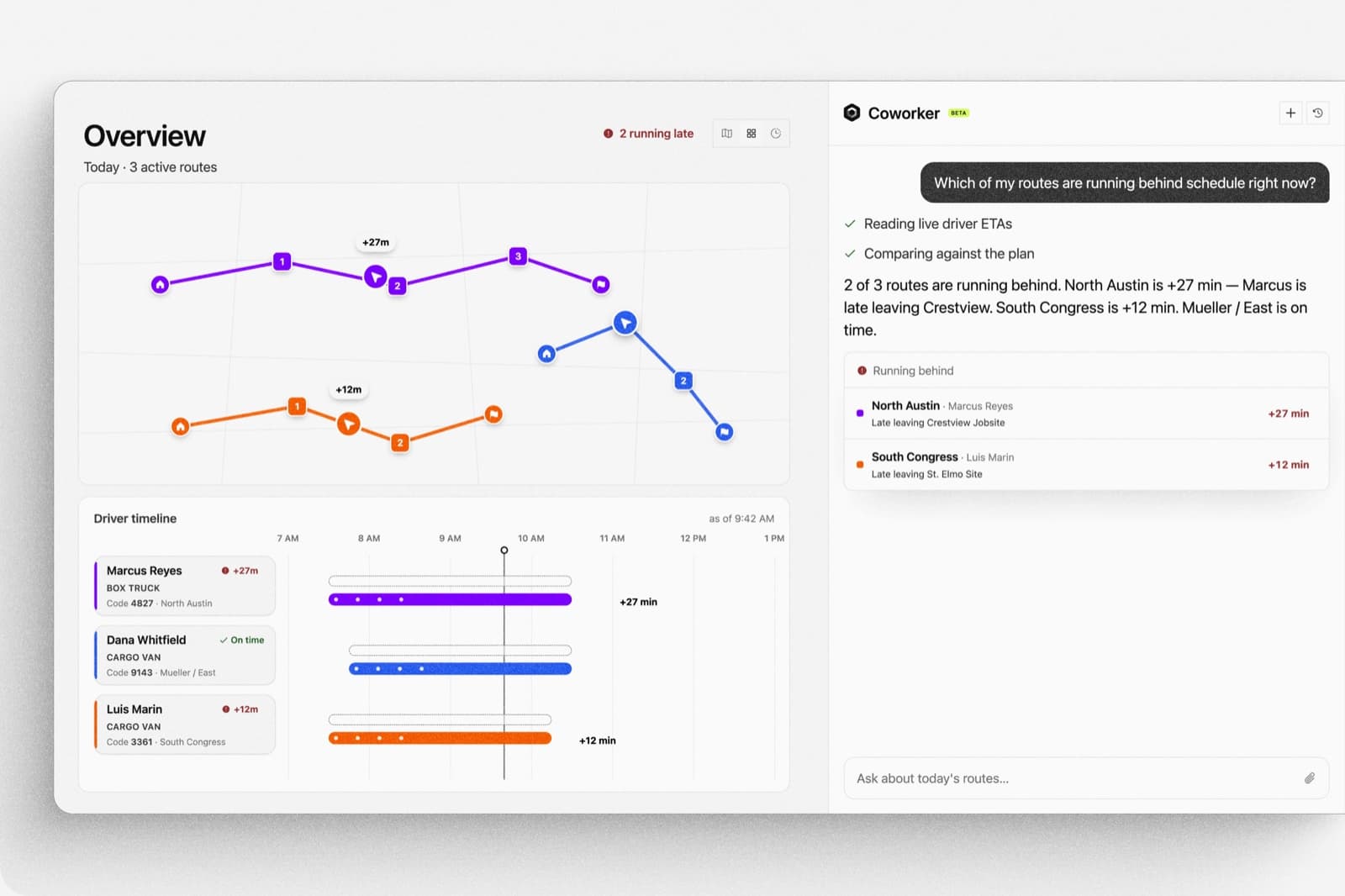
Dispatchers don't need another dashboard to dig through. They need an answer, and sometimes they need the work done. Route Planner's new AI Coworker handles both. Ask it anything about your routes, drivers, or deliveries and get a direct answer. Hand it a task, approve the plan, and it executes. Your approval required before anything changes.
No filters. No reports. No digging through menus. Type what you need, confirm what it proposes, and move on.
What dispatchers actually deal with all day
The data isn't the problem. Any dispatcher using Route Planner has access to on-time rates, driver performance, route timelines, stop details, and proof of delivery photos. The problem is getting to the right number at the right moment. Filter by date, switch to metrics, scroll to find the driver, open the route summary, check the stop log. When you're managing 30 routes and a driver just called with a question, that sequence takes too long.
The Coworker cuts that sequence down to a typed question. Because it sees the exact data you're already viewing, filtered to the accounts and dates you've already set, the answer is specific to your board, not a generalized report pulled from somewhere else in the system. For teams still deciding how a route planner fits alongside a TMS, this breakdown covers the difference.
Where the Coworker lives and what it can do
Metrics: The fleet analyst who never clocks out
Type a question, get a number. No dashboard-diving required. Ask about on-time rates, per-driver workload, departure consistency, POD compliance, or peak delivery patterns, all scoped to the accounts and date range you're already viewing. Want to compare this week to last? Type it.
Overview: Eyes on the live board with you
Ask which routes are running behind right now, who's driving which vehicle, whether a customer's delivery window was met, or where a specific order is by PO, BOL, or order number. It can pull POD photos and tracking links for any stop instantly. Your board, but answerable in real time.
Route Summary: The post-mortem that writes itself
The full story of any single route, on demand. Per-stop arrival times, dwell time, what was picked up and dropped, total miles and weight, skipped stops, ad-hoc additions, and POD photos, all in one place without pulling a single report.
Orders: Clears the backlog for you
Tell the Coworker what you need: create an order, reschedule a delivery, turn a sales request into a job. It handles the translation, and can answer "what's unassigned right now?" when you need a read before acting. You confirm before anything's created.
Plan: Builds and tunes routes on command
Describe what you need: re-optimize a route, reassign a driver, swap stops, change a vehicle, add or remove a stop mid-route, or auto-assign unassigned orders. The Coworker can handle it in bulk and shows you the full plan before it touches anything. You approve. Then it executes.
Account Settings: Configures your defaults for you
Update account defaults, preferences, and service rules by telling the Coworker what you want. No digging through menus to find the right toggle. Say what should change. Review it. Confirm.
For teams still exploring what AI adds to route planning more broadly, the top 5 benefits of an AI-powered route planner in construction logistics covers the full picture.
The Coworker is included on every Route Planner account. If your team isn't on Route Planner yet, the 90-day free trial includes full Coworker access from day one.
See how the Coworker fits your dispatch workflow. Request a demo.
The Coworker proposes. You decide.
Some dispatchers ask whether an AI assistant can accidentally change a route, create an order they didn't intend, or flip a setting without warning. The answer is no. On every action-capable surface (Orders, Plan, Account Settings), the Coworker shows you exactly what it's going to do before it does anything. You approve. Nothing happens without a human confirmation.
On Metrics, Overview, and Route Summary, it stays read-only. It can surface information, pull POD links, and answer questions, but it can't modify anything. Every operational change on those pages requires a human dispatcher to make it.
This matters for a practical reason. Dispatchers work under time pressure, and trust is slow to build with new tools. Seeing the plan before it executes means you can move fast without second-guessing. Route Planner was recognized for exactly this kind of approachability: Gartner's Best Ease of Use 2026.
Answers and action, in one place
The Coworker isn't a reporting tool or an automation tool. It's both, in a single interface. Read your board, ask a question, hand off a task. The work moves without you having to switch between views or wait for a report to load.
It's part of Core Intelligence, Curri's broader suite of purpose-built AI agents for distribution logistics, including a recently launched agent that lets teams book deliveries directly by email or text. All of this is available to Route Planner customers today.
See the Coworker in action
Try the AI Coworker yourself on Route Planner. 90 days free, no commitment.