The redesigned Curri Driver app: Faster, cleaner delivery

A delivery driver app is the mobile tool a driver uses to run a job from start to finish: accepting the delivery, navigating to the stop, and confirming proof with a photo or signature. The Curri Driver app is the part of the Curri experience most customers never see, and it just went through a significant redesign. For distributors, the design of that app matters more than most people realize. A cleaner, faster driver app means smoother handoffs, fewer callbacks, and quicker turnaround on every load.
Curri’s update focused on exactly that: a simpler flow, clearer screens, and less friction between picking up a delivery and confirming it landed. The result isn’t a longer feature list. It’s a smoother path for drivers to do the job right the first time, which is what shows up on a distributor’s side as cleaner proof of delivery and faster turnaround.
Why the driver app matters to distributors, not just drivers
Distributors never open the driver app themselves. A branch manager or sales team member puts in a delivery request, and the driver takes it from there. The delivery stays visible the whole way through with live tracking and SMS updates until a photo or signature confirms the drop.
That’s exactly why the app’s design carries so much weight. Every screen a driver taps through between "job accepted" and "delivery confirmed" needs to hold up in the field: daylight glare, a rush, one hand already full. Get that right, and none of it needs to reach a distributor at all: no support ticket, no call asking where the materials are, just an accurate status and a clean proof of delivery.
The driver app is just one piece of Curri’s last-mile delivery software, but it’s the significant piece drivers interact with all day, stop after stop. When the flow makes sense, drivers move through it correctly on the first go, without a call to dispatch asking what to do and where to go next. That’s the foundation of accurate proof of delivery and on-time status updates for every distributor and customer waiting on the other end.
What a redesigned delivery flow actually changes
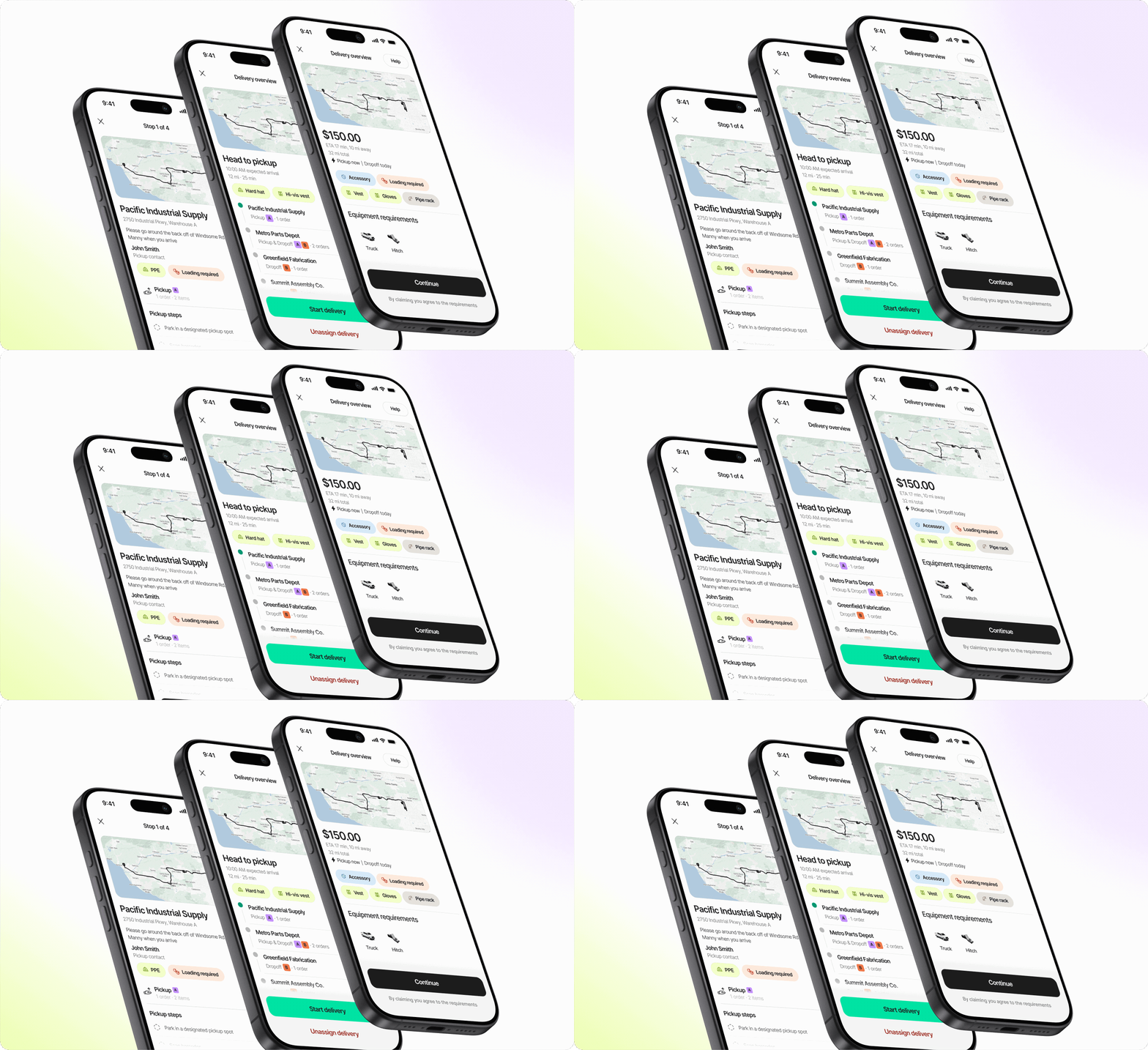
This redesign refreshed the core screens a driver uses most: accepting a job and its requirements, navigating to the stop, and confirming the drop, across every delivery type from Hotshots to Dedicated Routes. The goal wasn’t new functionality. It was to take a flow that already worked and make it faster and even more reliable.
“Modernizing the delivery flow started with real drivers showing us how deliveries actually go. We redesigned it to match those workflows, so it was intuitive on day one.”
The Curri team
Engineering & Product Design
Three specific changes came out of that pass, and each one improves the experience for the distributor waiting on the other end:
- Job details up front: Required safety gear and key job details, like a heavy load or an overnight hold, reach the driver automatically.
- Clear checklists: Proof steps like a photo or a signature are check-off items now, so a distributor gets them every time instead of chasing down a missing one.
- Progress tracker: Completed stops, active dropoffs, and order counts show up in one view, so a distributor can check status without calling dispatch.
In delivery execution software, small UI decisions compound fast. A driver making 15 to 20 stops loses real time when each screen takes a few extra seconds. For a distributor, those same changes mean less guesswork too: no more wondering which Bill of Lading got confirmed, whether the right stop got photographed, or whether a delivery is actually complete.
How cleaner app design cuts delivery errors
A confusing app produces confused drivers, and confused drivers produce delivery errors. This is the direct line distributors should care about most.
Every delivery has steps that must happen in order: confirm the pickup, navigate to the right address, capture proof at the drop. When an app buries those steps behind unclear icons, drivers improvise, and improvising is where signatures get skipped, photos get missed, and stops get marked complete out of order.
In effect, the driver app doubles as a proof of delivery app, and every design decision helps or hurts how reliably that proof gets captured. The fastest way to reduce delivery errors is to make the right action obvious. Maya, Curri’s AI dispatch copilot built on Core Intelligence, can catch problems after a delivery goes sideways, but the cleanest fix is preventing them at the source.
That matters even more for distributors running a mixed fleet, where Curri’s network of drivers works alongside a distributor’s own team. A consistent app experience means any driver picking up a delivery knows exactly what to do, without a phone call from dispatch to walk them through it.
Faster turnaround, from jobsite to invoice
A faster driver app doesn’t just help the driver. It shortens the whole chain between a delivery happening and a distributor being able to close it out.
Every second saved moving between screens means that stop takes less time, and the load behind it moves up sooner. Multiply that across a full day of stops and it adds up to real time back on the route.
The bigger win shows up after the drop. Combined with real-time delivery tracking, a faster app means distributors and customers both see an accurate status the moment it changes, not an hour later. Proof of delivery captured cleanly the first time flows straight into tracking and billing. No one has to call the driver to fill a gap.
If delivery volume is outpacing what an in-house fleet can run smoothly, request a demo to see how Curri keeps overflow deliveries moving as cleanly as the ones a distributor’s own team runs.
What to look for in a delivery driver app
Not every driver app is built the same way, and the differences show up fast once a distributor relies on it every day. A few things are worth checking before trusting any app with delivery execution:
- A delivery flow that matches the order drivers actually work in, not a generic checklist
- Proof of delivery steps, photo, signature, or both, that are clearly required, not skippable
- Real-time status updates that reach the distributor and their customer without a manual step
- A design simple enough that a new driver can run a delivery correctly without training
These aren’t small details. They’re the difference between an app drivers fight with and one they move through without thinking twice. The Curri Driver app gives drivers a single, consistent way to run deliveries across hotshot, scheduled, and route work, so the experience doesn’t change depending on the delivery job type.
See what a cleaner delivery flow looks like for your branch
Every delivery run through Curri gets the benefit of a faster, easier driver app.